The BBocs Digital Resource School Membership includes full access to all downloadable worksheets, songs, chants, and other printable resources in the curriculum packs. However, it does not include physical books.
You can print the worksheets directly from the downloadable curriculum packs to use in class. As your school grows, you may find that physical books are convenient for structuring lessons, reducing prep time, and offering a more organized experience for both students and parents.
Schools can also receive a discount on FUNbooks and other resources based on yearly volume. For more details, check out our discount policy here.
For more information or assistance with accessing your downloadable resources, please contact us anytime.
What resources are available for free without a membership?Jeremy2024-11-06T12:57:06+09:00
Printable flashcards, unit songs, chant videos, curriculum cards, ASK Cards, Sticktionary Cards, At Home Challenge Cards, and more are all free with a basic BINGOBONGO account. Register for free now!
Are there any hidden fees or additional costs?Jeremy2024-10-08T15:32:40+09:00
Manual renewals require the customer to make a payment before the end of the term to avoid service interruptions. Automatic renewals ensure continuous access without any gaps.
What happens if I cancel my membership mid-term?Jeremy2024-10-08T15:31:57+09:00
You will retain access to the services until the end of your current term, with no additional charges. You will also keep access to any materials you’ve already downloaded.
Can I change the number of members in my plan?Jeremy2024-11-06T12:42:06+09:00
Full PDF versions of FUNbooks are not available. All individual pages with answers are available in the downloadable curriculum packs, in the FUN!box, or in the GoZone. For assistance with signing up or any other questions, please contact us.
Can I purchase individual curriculum packs or resources without a membership?Jeremy2024-11-06T12:38:29+09:00
Yes. They are all available to purchase individually here. They are also included at no additional cost with the BBocs Digital Resources School/Institution Membership which also includes 25 free student accounts and 1-year unlimited access to the BBocs Digital Resources. So if you want all 10 levels of the download packs with over 7000 files included, the School/Institution membership is the clear winner. For assistance with purchasing accounts or any other questions, please contact us.
Do students need memberships for access to games and interactive resources at home?Jeremy2024-11-06T12:33:44+09:00
While basic songs and chants are free with a BINGOBONGO account, video lessons and interactive content require a student membership. Memberships can be purchased by parents or schools can get 25 free student accounts and with the with the BBocs Digital Resources School/Institution Membership. Additional accounts can be purchased at 40% off the retail price. For assistance with purchasing accounts or any other questions, please contact us.
What happens if new students join mid-year?Jeremy2024-11-06T12:30:35+09:00
New students can either pay monthly on their own, or schools can purchase a yearly membership at a prorated price. For assistance with purchasing accounts or any other questions, please contact us.
How much does it cost to purchase student memberships?Jeremy2024-11-06T12:29:59+09:00
Individual student memberships can be purchased directly by students here. For schools with the BBocs Digital Resources School/Institution Membership, 25 student memberships are included. Additional memberships can be purchased by the school at a 40% discount, allowing schools to provide or resell them to parents. For assistance with purchasing accounts or any other questions, please contact us.
What does a BBocs Digital Resources Teacher Plus membership include?Jeremy2024-11-06T12:23:46+09:00
Yearly memberships are on average 35% cheaper than paying monthly over the course of a year. Check out the various options here or contact us to find out more.
What are the pricing options for BBocs (BINGOBONGO Online Curriculum System) memberships?Jeremy2024-11-07T13:34:04+09:00
Step 1: Decide the length of classes for your STEAM and ESL/EFL Programming Course
Programming lessons can vary from 60 minutes to several hours. You will have to consider your existing classes and students’ schedules to decide the length and price. This STEAM ESL/EFL Programming course has several modular topics which can be used to structure a lesson as short or long as you need. These topics include exciting STEM/STEAM activities, programming challenges, typing practice, problem-solving games and puzzles, and autonomous project-based learning.
Step 2: Decide the lesson structure for your course
Developing a structured curriculum is key to the success of your course. The curriculum should be designed to gradually introduce students to complex concepts through a series of interconnected lessons. The Mind Mission Programming course materials offer a variety of problem-solving activities that can be incorporated into your curriculum. These activities are designed to stimulate critical thinking and creativity, enhancing the learning process. You can read more about creating a customized lesson routine in the Lesson Structure Breakdown section below.
Step 3: Preparing the Teachers and School to Adopt the new programming course
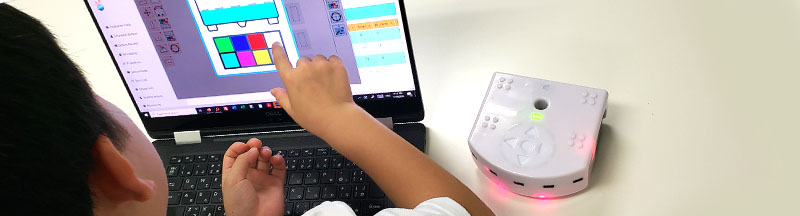
Equipping educators with the right tools and knowledge is essential. Training sessions on the Thymio II Wireless Educational Robot and BBBots.com kits ensure that teachers are prepared to effectively incorporate these technologies into their lessons. Classroom environments should also be prepared to accommodate interactive learning. Ensure that your classrooms are equipped with the necessary technology and space to facilitate hands-on activities and collaborative projects. At the minimum, 1 STEAM Kit per student per unit, and 1 Thymio II Robot and tablet per pair of students is ideal. If students are learning written programming languages, you will need 1 laptop computer per student.
Step 4: Acquire the Necessary Robots, STEAM Kits, and other required equipment
The integration of diverse educational tools like the Thymio II Wireless Educational Robot, BBBots.com kits, and the Mind Mission Programming course can significantly enhance the learning experience. These tools provide students with hands-on experience in STEAM and programming, making learning more engaging and effective. Discuss the specific benefits of each tool and how they can be used to complement each other in the classroom. For example, the Thymio Robot can be used to teach basic programming concepts, while BBBots.com kits can offer more advanced STEAM projects.
Step 5: Implement the Programming Course with Continuous Feedback
Launching the course should be followed by continuous monitoring and feedback. This approach allows for adjustments and improvements to be made based on student and teacher experiences. Encourage feedback from both students and educators to understand the effectiveness of the course. Use this feedback to make necessary changes and enhancements, ensuring the course remains relevant and engaging.
Lesson Structure Breakdown
Lesson 1: Introduction to STEAM Concepts
The first lesson should introduce students to basic STEAM concepts. Classroom teaching combined with worksheets and interactive puzzles or games makes the learning process engaging and fun. Introduce vocabulary and basic concepts through interactive discussions and activities. This approach lays a strong foundation for more complex topics in subsequent lessons.
Lesson 2: Reviewing and Introducing Programming
Lesson 2 continues by reviewing previously learned concepts and introducing basic programming challenges. Utilize resources like Thymio programming challenge cards to encourage students to think critically about how programs work. Students should explain their understanding in English before attempting to make and modify programs. This reinforces their language skills and programming knowledge simultaneously.
Lesson 3: Combining STEAM and Programming
In this lesson, combine the STEAM and programming aspects. For example, if the topic is wind, students could build an anemometer using a robot or a STEAM kit. If the topic is LED colors, they could program a robot to mix LED lights based on its orientation. This hands-on approach helps students apply their knowledge in practical situations, enhancing their understanding of both programming and STEAM concepts.
Lesson 4: Review and Exploration
The final lesson is dedicated to reviewing all concepts and allowing students to explore areas of personal interest. This could involve further programming challenges or STEAM activities. Encourage students to practice typing and other skills, and provide them with the opportunity to delve deeper into topics they find most engaging.
Now you’re ready to start your STEAM + EFL/ESL programming course!
Implementing a successful English Programming and STEAM course requires careful planning, the right resources, and a commitment to continuous improvement. By following these five steps and utilizing tools like the Thymio II Wireless Educational Robot, BBBots.com kits, and Mind Mission Programming, educators can create a dynamic and engaging learning environment. These tools and strategies not only enhance the learning experience but also prepare students for future challenges in an increasingly technological world.